Field Service Management • 6 mins read
6 Steps to Choose the Best Field Service Management Software

FieldEquip
Last Updated: September 3, 2021

Field workers perform different tasks, such as managing installations, repairing, or servicing equipment or software. With the best Field Service Management Software, these tasks can become well-organized. The field service software solution is a key facilitator for a service-based business to provide the best customer service and improve business efficiency.

But choosing the most suitable field service management software solution can be a little daunting as there are several products on the market. So, we have put together a guide that will help you choose the best field management software solution.
1. Identify the Areas that Require Improvement
To keep things simple, your fundamental workflow is to get the job, do it right the first time, and get paid for it. Check out the areas that have to be worked on.
Remember, the more specific you are, the better it is for you. Just saying that you have to be more organized is vague. So, pen down the problems as a list, and assign a dollar value to each issue.
Ball parking the figure is okay. But keep in mind, time is money.
2. Identify the Primary Service Characteristics and Service Process Scope
The type of service contracts that you offer, the type of organization you are addressing, and the way these services are being delivered, influence the capabilities that field service management software should offer. In order to understand the characteristics of your business that require support, you need to have an insight into the key service characteristics. So, here are a few things you need to take into account:
- The various service contracts provided and overall service offerings
- The way you are delivering the service, i.e. by using subcontractors, internal resources, or outsourcing of service activities
- Size of the service business in terms of revenue per annum, number of technicians and service managers, the total number of installed base objects, and the total number of service contracts
The functional scope of required software depends on the service processes that an organization should have. In order to be future-proof, the process needed in the future has to be identified so that it can support all the newly planned services.
3. Identify the Impact of the Software
Consider the cost of doing things inefficiently. Since you have listed the areas where you need to improve, it means the resources and time dedicated to them can be spent on something productive for your business, such as:
- Launching a new service or management program
- Field workforce utilization improvement
- Scheduling meetings to improve operational efficiencies
- Getting contracts in place for new and ongoing services
- Improving the fleet and logistics coordination
- Organizing and optimizing the technician’s mobility and availability
- Equipment upgrades and tool upgrades provided to the field service technicians

Try to get a picture of the impact these efficiency gains can have on your business. It will help you grasp on the effect that comes with the appropriate field service software.
4. Check the Hardware that Supports the Software
The choice of hardware matters to some extent in the successful integration of field service solutions. You have to expand your horizon and let your technicians work with various types of devices. You have to invest in a solution that will work across various multiple platforms e.g. iOS, Android, and Microsoft.
It is also necessary to decide on the operating system that you are going to work on. However, it is also crucial to take into account if the operating system of a device influences service productivity.
5. Check the Integration Capabilities with Your Current Software
Integration to other platforms i.e, ERP's, accounting, and payroll platforms should also be a key step for considering a Field Service Management software platform. Ensure you are able to keep your current workflows intact while utilizing the field service management software you choose.
6. Evaluate Field Service Management Products and Vendors
You have to shortlist the vendors and the product they offer. This has to be evaluated in detail. Get insight into how the product can address your functional and non-functional requirements.
Discuss your business requirements and desired operational improvements with the vendors to ensure the field service management software will fulfill your needs. Receiving a personalized demo of the product from the vendors allows you to address your unique needs in more detail. This will give you the opportunity to evaluate the customer service of the provider and gauge their expertise.
Bottom Line
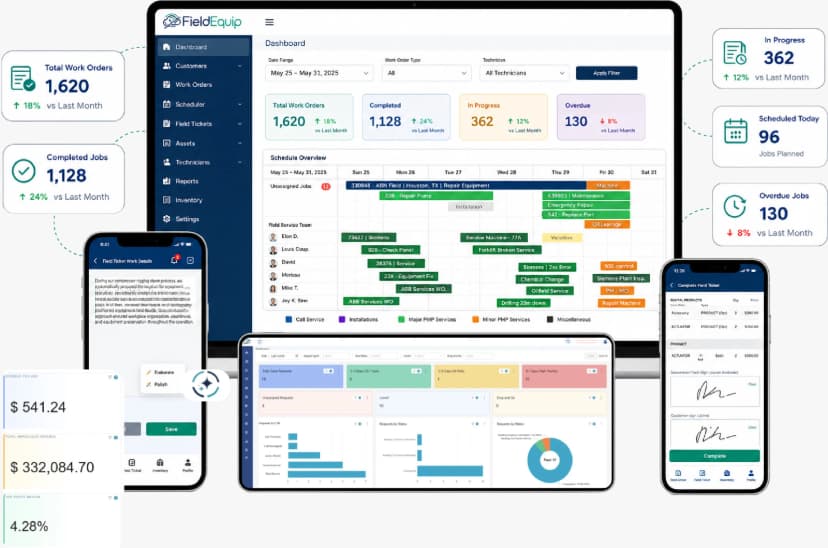
When it comes to the right field service management software, you have to choose the one that best aligns with the business requirements. Invest time and money to decide. But after you have decided, the solution will take care of your mobile field service activity. Get real-time insights for service operations, excel in decision-making, and seamlessly connect your devices with FieldEquip’s service management software.
Connect with the technician even in remote areas with our offline capability, assign the right technician to the right place, send alerts for last-minute changes, and more:
FieldEquip Field Service Management Software Features and Capabilities:
- Field Inventory Management
- Invoicing
- Reports, Analytics & Dashboards
- Scheduling & Dispatch
- Crew Time Tracking & Timekeeping
- Quoting/Estimation Management
- Spare Parts Management
- Digital Field Ticketing
- Proposal & WO Management
- Contract Management
- Customized Workflow and Notifications
- Work Order Sharing
- IoT Monitoring
- Customer Portal
- Install Base Management (Asset Management)
- Built-in Integration Capabilities Mapping to any standard API
What sets FieldEquip apart from the competition?
We want to make sure that we are providing the best solution for your unique operational needs. We also have access to our parent company, Bursys, where we can leverage 15+ years of experience providing you with custom solutions and further digitalization and integration capabilities to meet the unique operational needs of your organization.
Click here to schedule a free demo and discuss your needs in more detail with our field service software experts.
A Clearer Way to Run Field
Service Operations
Field service challenges are not just operational. They directly affect cash flow, billing accuracy, and scalability.
Schedule a Demo